Hotels in detail

Know which rooms are ready for arrival

Not just which jobs were closed. Define what ready means for a room, villa or bungalow, from turnover and inspection to the equipment inside it, and see every room as ready, not ready or unknown, with the reason. Housekeeping, maintenance and operations work toward the same room.

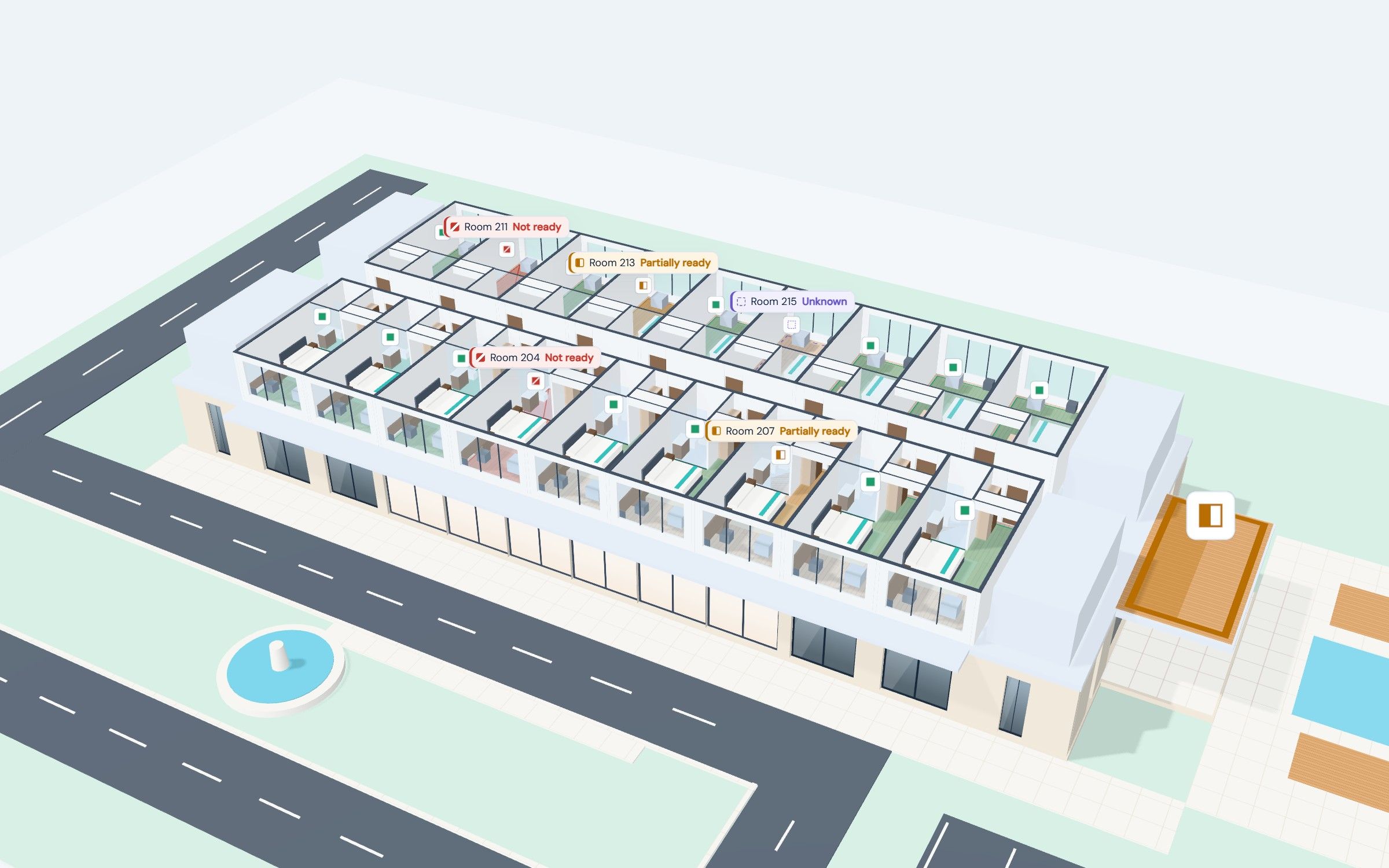
Floor 2 of The Superior Grand in 3D from above: rooms 201 to 218, each with a state plate. Labels mark the 5 rooms that are not fully ready. Walk through Floor 2 in 3D, room by room →
Room example

Follow an overdue service from the equipment to the room’s readiness

Equipment
AHU-204
Required within 90 days.
Recorded 94 days ago.
Failed
Room
Room 204
Not ready under this example standard, because the service on AHU-204 is overdue.

Completing the service updates the evidence. It does not by itself release the room.

Your teams

A guest sees one experience. Your team brings it together

  • Housekeeping Sees the room standard for the room in front of them.
  • Maintenance Sees why a condition needs attention, and what it affects.
  • Operations Reviews the picture before the first arrival.
One room standard

One shared picture of the room, not another chat.

The standard

You define it. The product reports against it

The team defines the standard for a room or an equipment type. The product shows what is met, what failed, and what is unknown, with the record behind each result.

  • Service within 90 days Recorded 30 days ago Met
  • Service within 90 days Recorded 94 days ago Failed
  • Service within 90 days No usable record Unknown
Measurement

What a property can watch

  • Readiness gaps How often a room falls short of its standard, and which requirement caused it.
  • Repeat visits How often the same condition comes back in the same room. A signal about the process, not a score for people.
  • Time chasing status How much of the day goes to finding out whether a room is ready.

All three come from the records your team already makes.

Founding Partner Program

What the 60 days look like for a hotel

  • Scope One room type or one equipment group at one property, chosen with you. Your PMS stays as it is.
  • What it asks One person who knows the standard, and a meeting every two weeks. We model your rooms and equipment and write the first standard with you.
  • What you see Every room in scope as ready, not ready or unknown, with the reason, and a list of the records that would turn the unknowns into answers.
FAQ

Frequently asked questions

Does it replace our PMS?

No. The PMS stays where it is, and SuperAssets connects to it: Mews today, with Oracle OPERA, Cloudbeds, protel, Apaleo and Stayntouch planned. Maintenance, inspections and room checks run in SuperAssets.

Can housekeepers and technicians use it on their phones?

Yes. SuperAssets installs on the phone home screen, on iPhone and Android. Your team sees its jobs, ticks off checklists and adds photo proof, stamped with who took it and when. Their own jobs for the next 48 hours keep working without signal and sync when they are back online.

Does it track spare parts?

Yes, as an optional module: stock levels, low-stock alerts, the parts used on each job, and work paused while it waits for parts.

Who defines the room standard?

The property does. The requirements and intervals are yours to set and change.

What changes for technicians and housekeepers?

Less chasing. When a requirement fails, the work arrives on their phone already assigned, with the reason, instead of a call or a message. They complete it as they do today, with the checklist when the work has one. An unknown never creates work on its own.

Does every housekeeping or maintenance event update readiness?

Every record that a requirement checks does, as soon as it arrives. The guest-ready policy includes “turned since the last checkout”, and with Mews connected the room’s housekeeping status comes in from Mews. Records that no requirement checks leave readiness as it is.

What would make your room status easier to trust?

Get my free room report