Result
Not ready
Met
A closed task does not tell you a room can be sold, a rack can take load or a shuttle can leave. SuperAssets tells you, from the records your team keeps. Define what ready means for every asset, see whether each one is fit for purpose and why, and let the tasks, checklists and schedules work toward it.
Go straight toHotels and resorts →Data centers →
Works on top of the tools you run today. Retire them only if, and when, you choose. Open now for founding pilot partners in hotels and data centers.
In a hotel: Room 204 is not ready for arrival, because its air handler is overdue for service. The work goes to maintenance.
In a data center: Hall B is not ready for the next shift, because a cooling unit is overdue for service. The work goes to the facilities team.
In a fleet: Shuttle 3 is not ready for the 7:00 run, because its brake inspection is overdue. The work goes to the workshop.
How to read this example
The overall verdict depends on every applicable requirement. This is an example, not a live feed.
Why we build this
At 10 p.m., an operations manager is not asking whether the last task was ticked off. In a hotel, a data center, a warehouse or an office building, the question is the same: is this asset ready for operations, fit for purpose? Most tools track the tasks around an asset and leave that answer to one experienced person, a spreadsheet and a phone call.
Operational readiness is not a task list. It is a state.
01 / How it works
Set the state you want each asset in. Then use tasks, checklists, reviews and readings to reach it and keep it there.
Task tools ask whether the work was done. SuperAssets asks whether the asset is ready.
For each kind of asset, your team writes a readiness policy: the requirements it must meet. For a room that might be: cleaned and inspected, linen stocked, air conditioning serviced. A requirement can be as small as “shift manager review approved” or as full as a service with its checklist.
Each requirement is checked against the records: work orders, inspections, readings. Missing records show as unknown, never as a pass.
Every asset is ready, not ready or unknown, with the requirement and the evidence behind it. Equipment rolls up into the room, rooms into the floor.
When an asset drops out of ready, the failed requirement is raised. Where an action is set up, the work is created and assigned to the right team. Where it is not, the missing work is named for a person to decide.
Every team’s finished work updates the same asset, and its state is checked again against the same policy.
Four possible results
Missing records show as unknown. Unknown is never a pass, and it never creates work on its own.
The requirement is satisfied. No work is needed.
The evidence is missing or unclear. A person reviews it, and no work is created.
The requirement is not satisfied. If an action is set up, the work goes to the right team.
The requirement is not satisfied and no action is set up, so a person decides the next step.
Corrective work depends on configuration. Missing evidence does not create a task. Updated records inform the next check.
See the product
The check, the reason and the next step, as your team sees them.
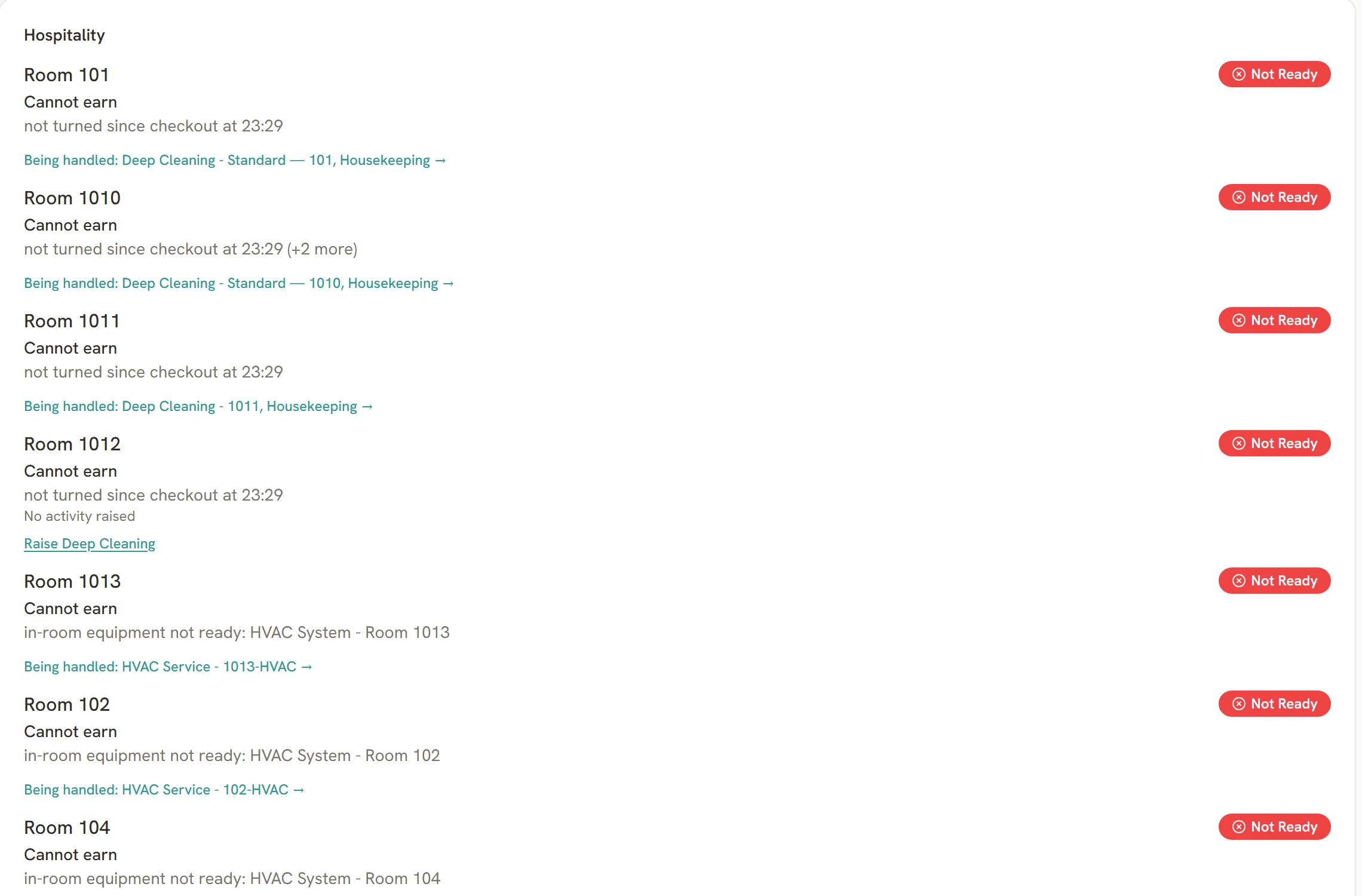
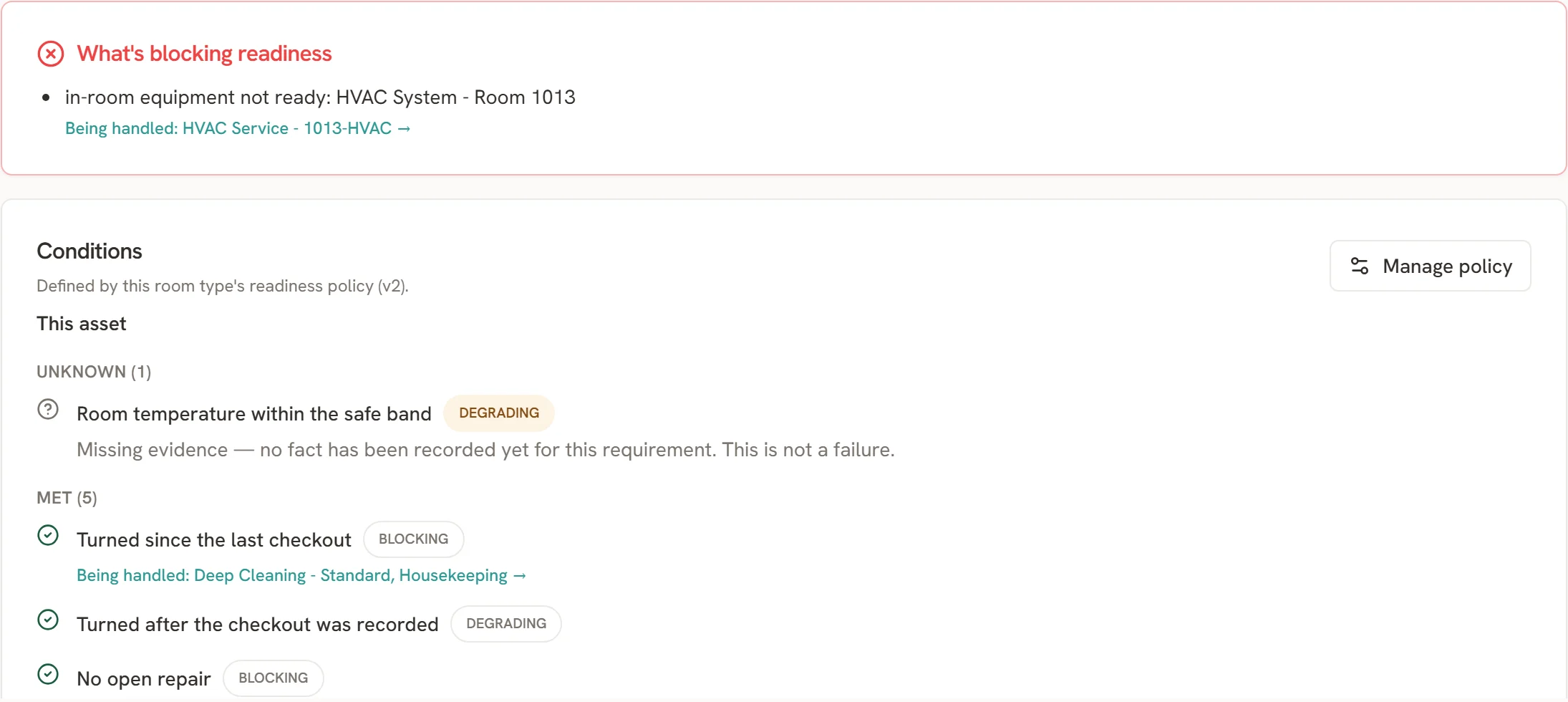
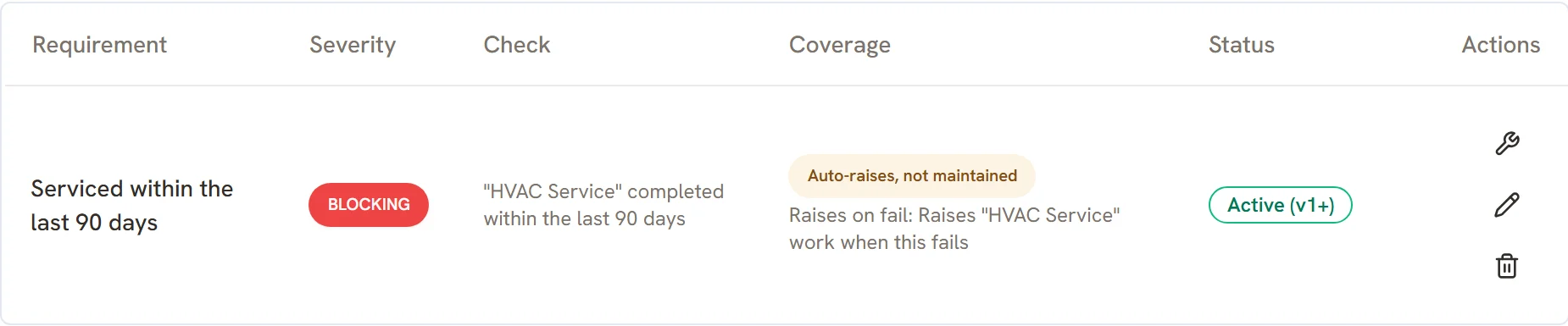
Screens from the SuperAssets demo hotel. “Cannot earn” marks a room that cannot be sold right now.
02 / Solutions
Any operation can be modeled: a hotel room, a villa, a vehicle, a server rack, a machine. We start with hospitality and data centers, where an asset that is not ready costs money right away and where people on our team have worked, and add what our customers ask for next. Our aim: the readiness engine for physical operations.
Alongside your tools
SuperAssets reads the records your team already keeps, so you see readiness from the first week. When your team is ready, it moves its work over and the old tool can go.
In your maintenance or hotel operations tool, as it is today.
SuperAssets reads your work orders, inspections and maintenance records. Connectors are built per system, on request.
Each requirement in your standard is met, failed or unknown, with the reason.
Where an action is configured, a failure raises work for the right team.
03 / One example
See how one recorded condition becomes a clear reason and a practical next step.
These are separate condition examples. Overall readiness depends on every applicable requirement.
04 / People
In most operations, what ready really means lives with the one person who has done it longest. That is an unfair burden, and when they walk out the door, your standard walks out with them. SuperAssets makes ready a shared statement: housekeeping, maintenance, operations and vendors all report up into the same asset and the same policy, so the whole team knows what has to be true before it counts as ready.
05 / Value
Value is measured in a pilot on your own operation, against your own baseline, using these three measures.
06 / Pricing
Pricing is based on the assets under your standard, not on how many people work on them. Plans start at 25 assets. The price per asset depends on how many automation rules apply. Users are unlimited.
07 / FAQ
The state of an asset against what your team defined as ready: ready, not ready or unknown, with the reason. It answers the question task tools leave open: can this room be sold, this vehicle leave, this rack take load?
Ready means every applicable requirement you defined is met, based on the records the product can read. You set the requirements. The product reports the result and the reason behind it.
Not on its own. A closed work order updates the evidence. The next check re-evaluates every applicable requirement, and the verdict follows from all of them.
Any record the product can read: a completed work order, an inspection, a reading, a photo, or a sign-off as small as “shift manager review approved”. A task can require a finished checklist before it counts.
An honest first map. Every asset shows ready, not ready or unknown, and the unknowns point to exactly what nobody can prove today. You close those gaps one requirement at a time, with an inspection, a review or a connector.
The requirement is reported as unknown, not failed. Unknown means the evidence needs review, and no task is created from missing evidence.
Yes, for supported conditions with an active action configured: a failed requirement opens a work order for the right team. Other failures are reported for a person to review or configure.
It can, if you want it to. What happens when an asset is not ready is yours to decide: raise work, notify a person, or take the room out of sale in a connected PMS.
You do. We build the first one with you, and after the first day your team knows how to extend it. The requirements, the preventive maintenance intervals, and the configured actions are yours to define and to change.
Tell us. Cleaning, inspections, sign-offs, services, readings and parts are already there, and a new kind of requirement is built from the same parts.
Not on day one. Most teams start on top of the maintenance (CMMS) or hotel operations tool they run today, and move their work over when they are ready. It does not replace a PMS, BMS or DCIM: those keep running, and SuperAssets connects to them. If a connector you need is not built yet, we build it on request, at no cost, in the order our customers ask for them.
Often many do, and that is the honest starting point, not a failure. Each unknown names the record that is missing, so day one gives you a to-do list of what to check or record first. Unknown never raises an alarm or creates work on its own, and the count goes down as records come in.
You pick one room type, rack row or vehicle group and send us what you already have: an export from your PMS or maintenance tool, or a spreadsheet. We map it to a readiness standard and walk you through the result live, on a call: what is ready, not ready or unknown, and why. If your export holds personal data, we sign the data processing agreement first. It is free, and there is no obligation to start a pilot.
With a free readiness snapshot: we map one room type, rack row or vehicle group from the records you already have and show you the result live. If it fits, it becomes a founding pilot.
No. A ready verdict means the requirements you defined were met by the records available. It is not a safety certification, and it does not guarantee availability.
08 / Free readiness snapshot
Pick one room type, rack row or vehicle group. We map it from the records you already have and show you its readiness live. Free, no commitment.
Your snapshot request is received.
A person will reply, not a sequence.
Your request wasn’t sent.
Email demo@superassets.app and we will pick it up from there.