Solution / Data Centers

Hand over a hall that is ready, and say why

The next shift relies on the picture you leave behind. Define what ready means for every rack, unit and hall, and hand over a verdict with its evidence, not just a status.
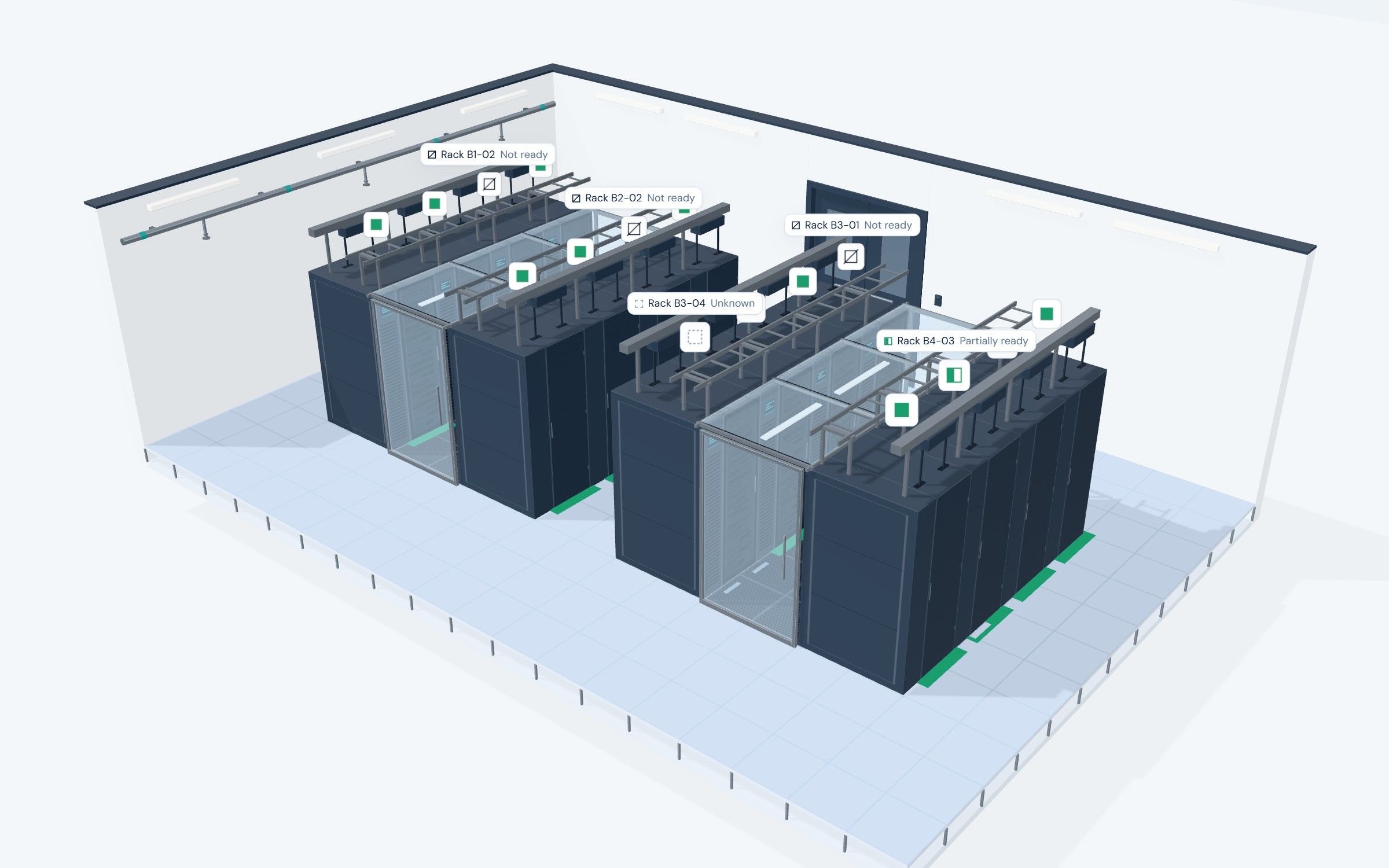
Hall B in 3D from above: 16 racks in four rows, each with a state plate. Labels mark the 5 racks that are not fully ready. Walk through Hall B in 3D, rack by rack →
Recognition

The next shift needs more than a status

  • Requirement What has to be true for this equipment type.
  • Evidence The record the verdict was based on.
  • Unresolved condition What is still open, and who it sits with.
The standard

Requirements for an equipment type, and what depends on it

Define the requirements for an equipment type, including how a failure affects the assets that depend on it. The requirement, the evidence, and the reason stay connected.

  • Filter service interval Recorded within the interval Met
  • Filter service interval Recorded outside the interval Failed
  • Filter service interval No usable record Unknown
  • UPS battery test Tested within the interval Met
  • Generator load test Last load test outside the interval Failed
  • Chiller service No usable record Unknown

Illustrative examples. Requirements are set per equipment type and your team chooses the intervals. Sites sit under one organization, and each site keeps its own data.

Example

One condition, explained

Cooling unit
CU-04
Filter service is outside the configured interval.
Verdict
Not ready under this example standard
Reason: filter service is overdue.
Next step
Service work
Facilities team

This is equipment readiness. Its effect on the wider operation depends on policy, dependencies, and redundancy.

Handover

A summary the next shift can read

Illustrative
Requirement
Filter service within the configured interval
Recorded evidence
Last service recorded outside the interval
Associated work
Service work, facilities team

Measurement

  • Status effort How much work it takes to establish the current condition before a handover.
  • Time to raise work How long from a failed requirement to work assigned to a team.
  • Time to restore the condition How long until the requirement is met again.

Account for redundancy and other systems before attributing any change in service availability.

Founding pilot

What a pilot looks like for a data center

  • Scope One rack row, one equipment group or one handover, chosen with you. Your BMS, DCIM and ticketing stay as they are, and nothing touches controls.
  • Cost The snapshot is free. The 60-day pilot costs 25% of the regular per-rack price, which we set with you while data center prices are indicative.
  • What it asks One person who owns the handover, and a meeting every two weeks. We load your records and write the first standard with you.
  • What you see Every rack and unit in scope as ready, partially ready, not ready or unknown, with the reason, in a summary the next shift can read.
FAQ

Frequently asked questions

Does it replace monitoring, BMS, or DCIM?

No. Those systems stay in place. SuperAssets checks the requirements you define against the records it can read.

Does an equipment-ready verdict guarantee uptime?

No. It means the requirements for that equipment were met by the records available.

Is telemetry assumed?

No. Telemetry is not assumed. You can send readings and events today through our ingest API, read-only from your side. Connectors to your BMS, DCIM or ticketing system are built on request, at no cost, in the order our customers ask for them.

Does an unknown pull the hall down at handover?

An unknown requirement makes its rack unknown, not not ready, and it never raises work on its own. The hall shows how many of its racks are unknown, so the next shift knows what to verify first instead of chasing false alarms.

Does a failed requirement open a ticket in our ticketing system?

Not today. The work is created in SuperAssets and assigned to a team or a person, with the reason. Writing it into your ticketing system comes after the read-only connectors, so you never have two queues by surprise.

Does it replace the walk-round or the BMS?

No. Alarms stay in your BMS and the walk-round stays. SuperAssets tells the walk-round where to look first: which racks and units are not ready or unknown, and why.

Our cooling is N+1. Does one unit down make the hall not ready?

No, unless you want it to. Severity is yours to set, and roll-up rules already let a hall show partially ready, with its reason, when one of its units is down instead of failing outright. Full redundancy groups, such as “at least 3 of 4 cooling units serving this hall”, are on our roadmap.

What does the next shift need to know?

Get a free readiness snapshot